Why Does My Dasha Timeline Look Different on Different Astrology Websites?
Find out why different astrology websites show varying Dasha dates due to Ayanamsha choices and time zone rules.

It’s a common and frustrating experience: you enter the exact same birth details into two different astrology sites, and the Dasha dates come back slightly different. Sometimes it’s a matter of days, other times entire years are off. Rather than a glitch, this usually comes down to a handful of technical settings hiding behind the scenes. Here’s what actually causes the mismatch and how to figure out which result to trust.
Why Two Dasha Calculators Can Produce Different Timelines
Most Dasha calculator discrepancies trace back to differences in the underlying settings each platform uses by default. Two tools can use the exact same Vimshottari formula and still produce different output if their Ayanamsha, time zone handling, or rounding methods don’t match.
It’s less about one calculator being “wrong” and more about each one making slightly different assumptions unless you configure them the same way.
How Different Ayanamsha Settings Can Affect Astrology Calculations
The Ayanamsha is the value used to convert tropical zodiac positions into the sidereal system that Vedic astrology relies on. Popular options include Lahiri, Raman, and Krishnamurti, and each one shifts planetary positions by a slightly different number of degrees.
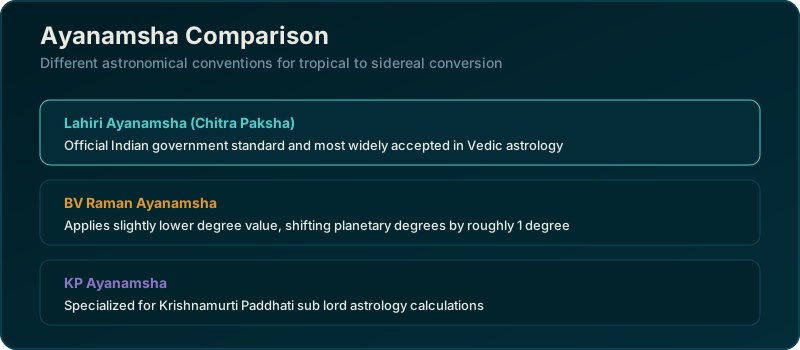
Since your Moon’s exact degree determines your Nakshatra, and your Nakshatra determines your starting Dasha, even a small Ayanamsha difference can nudge your entire timeline.
Why Birth Time and Location Settings Matter
Some websites default to noon if no birth time is entered, while others require an exact time before generating results at all. Location settings work similarly. If a site rounds your birthplace to the nearest major city instead of your exact coordinates, the calculated Moon position can shift.
Always double check that both fields were entered precisely, not left on a default placeholder.
How Time Zone and Daylight-Saving Settings Can Change Results
Historical time zones and daylight-saving rules have changed over the decades in many countries, and not every calculator accounts for this correctly. If a tool applies the wrong offset for the exact date and region of your birth, your calculated birth time in Universal Time will be off, sometimes by a full hour.
That hour can be enough to shift you into a different Nakshatra and change your first Mahadasha.
What Is the Difference Between Common Dasha Calculation Methods?
While Vimshottari is the most widely used system, other Dasha methods exist, including Yogini and Ashtottari Dasha. If two sites are quietly using different systems, or slightly different variations of Vimshottari, the results will never match, regardless of how accurate the birth data is.
| Setting | Common Variations |
|---|---|
| Ayanamsha | Lahiri, Raman, Krishnamurti |
| Dasha system | Vimshottari, Yogini, Ashtottari |
| Time zone handling | Manual, automatic, historical database |
How Different Software Can Display the Same Dasha Differently
Even when two tools agree on the underlying dates, one might round to the nearest day while another shows exact hours and minutes. This creates the appearance of a discrepancy that’s really just a formatting choice rather than a calculation error.
Checking whether a site displays full precision or rounded dates can clear up a lot of apparent confusion.
Why Nakshatra Calculations Matter for the Starting Dasha
Your Nakshatra at birth is the single most important input for determining your starting Mahadasha. If two platforms calculate your Moon’s position even one degree apart due to Ayanamsha differences, it’s possible, though not guaranteed, for that to push you across a Nakshatra boundary entirely.
That boundary shift is often the real reason two sites disagree on which planet’s period you’re starting in.
How to Compare Dasha Results Without Mixing Calculation Settings
The cleanest way to compare two tools fairly is to check whether both use the same Ayanamsha and the same Dasha system before assuming either one is broken. Many platforms list this setting somewhere in their chart options or documentation.
If both match and the results still differ, the birth data entered is the next thing worth reviewing.
Which Input Details Should Match When Comparing Websites?
At minimum, confirm that birth date, birth time, birth location, Ayanamsha, and Dasha system are identical across both tools. If all five match and the output still diverges, that points to an actual calculation bug rather than a settings mismatch.
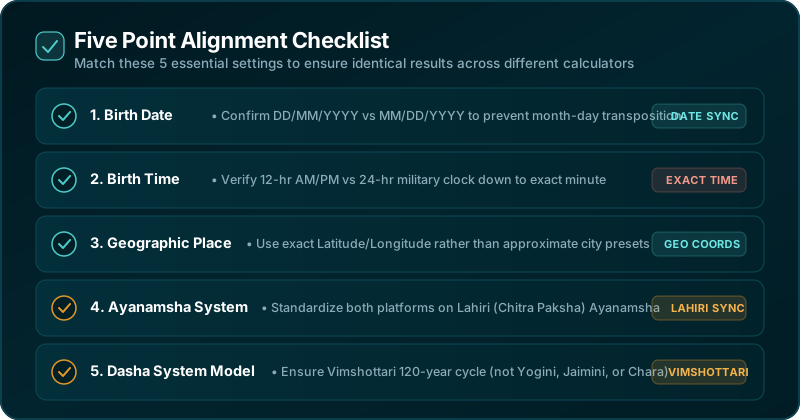
Keeping a simple checklist of these five inputs makes it much easier to troubleshoot conflicting results.
Conclusion
A mismatched Dasha timeline almost always comes down to differences in Ayanamsha, time zone handling, or the Dasha system being used, not a fundamentally broken calculation. Once you align these settings across the platforms you’re comparing, most discrepancies disappear, leaving you with a timeline you can actually rely on.
Calculate Your Active Dasha Now
Discover which planet is influencing your life path and unlock your personalized astrological timeline.
Open Free Dasha Calculator →